
How I Use LaunchBay (the best project management software for creatives) to Run a Seamless Client Experience
First impressions don't end at the proposal. They continue every time a client logs in to check on their project. Here's how I've built a client experience that feels incredible from kickoff to handoff, (and the tool making it possible.)
There's a version of running a design studio that involves sending files over email, chasing clients for feedback in DMs, and hoping they remember which Google Drive folder has the final assets. I did not want that version. :)
When I was building out the operations side of Knight Theory, I had one non-negotiable: clients needed to feel like they were working with a real studio, not a freelancer duct-taping things together. (Aren’t we all?) That meant every touchpoint from onboarding to delivery had to feel considered and intentional.
That's where LaunchBay came in!
What LaunchBay actually is
LaunchBay is a client portal platform built specifically for service businesses. It gives you a branded space where clients can access their project, review deliverables, sign off on phases, and stay in the loop, all without you having to manually forward links or remember to remind clients to check their emails.
◈ Branded portal
You can customize it with your logo and brand colors
◈ Project phases
Organize deliverables by stage so clients always know where things stand
◈ File delivery
Share assets cleanly with version control and client-facing notes (or internal-only) notes
◈ Approvals
Get signoffs with a click of a button
How I use it at Knight Theory
I use LaunchBay as the primary client portal for all creative projects that come through the studio. Once a client signs and pays their first installment, they get access to their portal and everything lives there from that moment on.
Onboarding
The portal is set up using a project template that has onboarding tasks, questionnaires, and guides all prepared and ready to do. By the time we hop on our kickoff call, the client already knows where to find their project details, what the phases look like, and what's expected of them at each stage. It immediately sets a professional tone and signals that our project together will be a well thought-out operation.
Deliverable review
Every round of design (brand direction presentations, web mockups, asset exports) goes through the portal instead of fishing through email threads. Clients click in, see the work in context, and give feedback or approve directly from the platform. I also embed recorded video walkthroughs to the task to explain my design choices async.
Final handoff
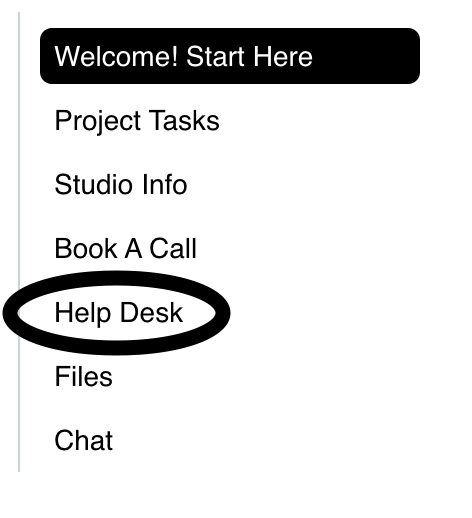
When a project wraps, I’m able to easily share brand files and deliverables in the portal for clients to download in one go. The portal also serves as a place for me to accept ticketed help requests via form during clients post-project support period!
The features that run my studio
Here's the thing about LaunchBay: it looks like a client portal, but it runs like a full studio ops platform. These are the other specific features I rely on and why each one earns its place in my stack.
Project templates
I built templates for each of my service tiers once and never have to reconstruct a project from scratch. Every new client gets the same polished, phase-by-phase setup automatically. It keeps my process consistent and means onboarding a new project takes minutes.
Contracts & invoicing
You can send contracts for e-signature and issue invoices directly within LaunchBay without having to bouncing between platforms. For smaller engagements, having the entire commercial relationship (agreement, payment, delivery) in one place is a genuine time saver and makes the client experience feel seamless end to end.
Client reminders
Set automated reminders so clients get nudged when something's waiting on their end; a review, an approval, or any other outstanding info. This one feature alone has reduced the amount of time I spend chasing. Polite, automatic, and keeps projects moving without me having to be the pushy one.
Zapier integration
LaunchBay connects with Zapier, which means it plugs cleanly into our wider automation stack. I use this to trigger actions in other tools when project milestones are hit, (new client added, phase completed, form submitted.) If you're already running automations in your business, LaunchBay slots in rather than creating a silo.
Forms with conditions
The built-in form builder supports conditional logic, so the questions a client sees can adapt based on what they've already answered. I use this for intake forms that only ask relevant follow-ups depending on the type of project. It makes the onboarding experience feel personalized rather than like a generic questionnaire.
Task tagging
Tasks can be tagged and filtered, which matters more than it sounds once you're managing multiple active projects. I can slice my view by project phase, priority, or type, and clients see only what's relevant to them without getting overwhelmed by the full production picture.
Built-in proofing
This is the feature I knew I needed, but was paying an arm and a leg for seperately. LaunchBay has native proofing capabilities! I upload brand decks, moodboards, or design presentations directly to the portal and clients can click to leave pinpoint comments on the creative itself. The comment is attached to the exact thing they're reacting to. It replaces a separate tool entirely and keeps all feedback in the project record where it belongs.
What it actually costs
This is where the math gets interesting. Think about what a fully-equipped creative studio stack used to require: a client portal, a proofing tool, a contract and e-signature platform, an invoicing system, a project management tool, and some kind of automation layer to connect them all. That's five or six separate subscriptions, five or six logins for your clients, and five or six chances for something to fall through the cracks.
LaunchBay collapses all of that into one platform and prices it accordingly.
Plans start at $19/month (billed annually) for solo operators; that's the Essentials tier, which already includes branded portals, unlimited projects and clients, deliverable proofing, contracts, invoicing, intake forms with conditional logic, and magic link access so clients never need a password. For most freelancers and studios alike, it covers everything.
Combining other tools vs. one LaunchBay plan
Client portal tool ~$40–60/mo
Proofing / feedback tool ~$30–50/mo
E-signature / contracts ~$15–25/mo
Invoicing platform ~$15–20/mo
Project management ~$15–25/mo
Total vs. LaunchBay Essentials: $105–170/mo $19/mo (annual)
There's also a free trial with no credit card required, so you can build out your first project template and get a feel for the platform before committing to anything. (I'd encourage doing exactly that!)
Why it matters more than you'd think
There's a version of this where you tell yourself the work speaks for itself and the logistics don't matter.
Clients (especially the startup founders and brand-conscious businesses I work with) make judgments about quality based on the full experience. If your process feels disorganized, it creates doubt about your work, even when the work is excellent. A polished client experience is part of your brand.
The ROI isn't just in time saved (though that's real). It's in the referrals you get when a client tells another founder, "working with them was incredibly smooth." It's in the repeat business from clients who had such a good experience they came back for the next phase. It's in your own confidence when you onboard someone new and know exactly what they're walking into.
Who else should be using this
If you're running any kind of creative service business and delivering work to clients, this is for you! More specifically:
Fellow web designers and developers who want a cleaner way to share staging links, get feedback, and deliver final files
Brand strategists and identity designers delivering multi-phase projects with lots of assets
Copywriters and content strategists managing draft rounds and approvals
Marketing agencies running multiple client projects simultaneously who need to keep things organized without a full project management overhaul
Solo operators who want to look and feel like a proper studio from day one
You don't need to be large or established to have a professional client experience. LaunchBay makes it achievable at any stage.
The LaunchBay team is also genuinely lovely—responsive, thoughtful, and very much open to feedback. As someone building a studio on a lean stack, that kind of support matters a lot.
Start for free
Try LaunchBay for yourself
Affiliate disclosure: This post contains an affiliate link. If you sign up for LaunchBay using my link, I may earn a commission at no additional cost to you. I only recommend tools I personally use and genuinely believe in, and LaunchBay is a real part of how Knight Theory operates; this recommendation reflects that.
