Shopify Free Trial in 2026: What You Can (and Can't) Test Before You Commit
You're not ready to pay for something you haven't seen work yet. Fair enough!
So you Google "Shopify free trial," sign up, and spend the next three days clicking around wondering what you're even supposed to be evaluating.
Here's exactly what the Shopify free trial gives you in 2026, what it deliberately withholds, and how to use your trial window the most effectively.
What the Shopify Free Trial Looks Like in 2026
Shopify's standard free trial gives you 3 days of full platform access with no credit card required at sign-up. After those 3 days, you'll need to select a paid plan or take advantage of a promotional offer (more on that below) to keep your store active.
The trial drops you into a fully functional Shopify environment. You get the admin dashboard, the theme editor, the product catalog, the app store, and most of the backend settings you'd use day-to-day.
Three days sounds short because it is. Plan what you want to test before you start the clock.
What You CAN Test During the Trial
Here's what you can meaningfully evaluate before spending a dollar:
Theme customization – Browse and install free themes from the Shopify Theme Store. Edit colors, fonts, sections, and layouts using the drag-and-drop editor — no code required. Paid themes can be previewed but not fully customized without purchasing.
Product setup – Add real products with images, variants, pricing, and descriptions. This is one of the most useful things to test because the product management experience varies significantly across platforms.
Navigation and collections – Build out your menu structure, create product collections, and see how your catalog organizes itself at scale.
App integrations – Browse the Shopify App Store and install free apps. Email marketing tools, review widgets, inventory managers — most have free tiers worth testing.
Checkout flow – View the checkout experience as a customer would, including cart behavior, discount code fields, and overall UX. You just can't process real transactions.
Shopify POS – Planning to sell in person? You can explore the Point of Sale interface during the trial.
Basic analytics and reports – The dashboard gives you a preview of the reporting interface, though you'll need a paid plan to see meaningful data once you're live.
Staff accounts – Set up additional accounts to test collaborative access.
That's a solid list! The trial is useful for evaluating whether Shopify's interface works for both your brain and your product catalog.
What You CANNOT Do on a Free Trial
This is the part most people gloss over:
You cannot accept live payments. Your store won't process real orders until you're on a paid plan. No soft launches, no checkout conversion testing, no validating whether your product sells.
You cannot connect a custom domain. Your store lives at yourstore.myshopify.com during the trial. (You can purchase or connect a domain, but it won't go live until you upgrade.)
Abandoned cart recovery emails are locked behind paid plans. You won't have access to that feature during the trial.
Shopify Payments and real payment gateways are unavailable. The payment infrastructure stays off until you're on a plan.
The "Powered by Shopify" footer branding stays put. Minor, but worth knowing if you're doing any pre-launch screenshots.
The trial is excellent for building and evaluating, but it's not a substitute for a real launch. If you need to validate sales before committing, the $1/month offer below is the much smarter move.
The $1/Month Offer: Is It Still Around?
Shopify has run a promotional offer for a while now — $1/month for the first three months. As of 2026, this offer still appears periodically, though Shopify rotates it and it's not always front-and-center on the homepage.
The best way to find it: sign up for the free trial, then check the upgrade prompts as the trial winds down. Shopify frequently surfaces the promotional pricing right at that moment. You can also find it through certain referral links or by searching "Shopify $1 offer" directly.
At $1/month for three months, you get a fully live store — real payment processing, a connected domain, and the ability to run actual transactions.
The $1 offer typically applies to Basic, Shopify, or Advanced plans. Shopify Plus has its own pricing structure entirely.
Which Shopify Plan Should You Start With?
Once the trial ends, most new stores land on one of three plans:
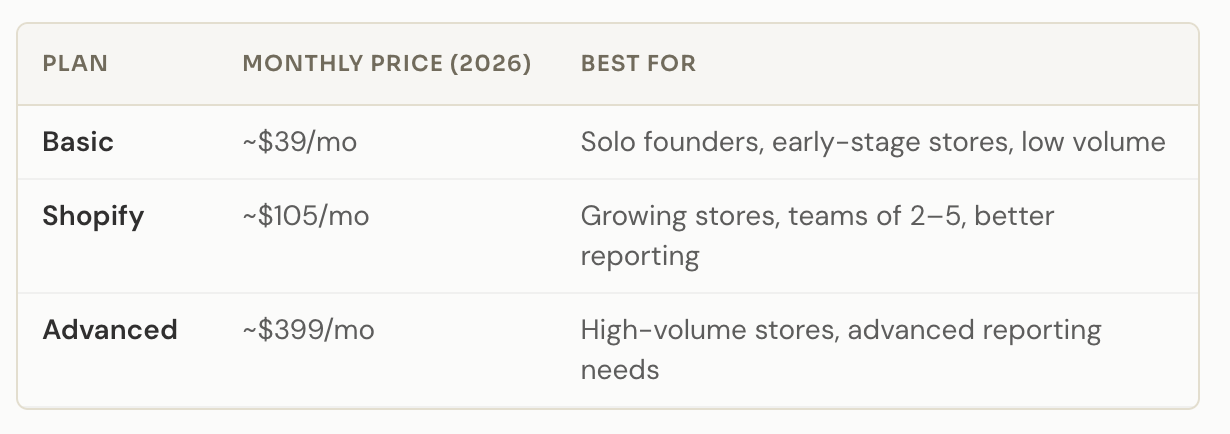
(Prices reflect standard monthly billing. Annual billing reduces these significantly.)
For most founders launching their first Shopify store, Basic is the perfect starting point. You get payment processing, abandoned cart recovery, discount codes, and a custom domain. The main trade-offs compared to higher plans are reporting depth and slightly higher transaction fees if you're not using Shopify Payments.
Already doing meaningful volume and migrating from another platform? The mid-tier Shopify plan is worth the jump. (The reporting alone saves hours.)
What Most Founders Miss Before They Commit
Shopify is a strong platform. But the trial period tends to focus your attention on the wrong things. You spend time picking a theme and adding products (which is fine) but here are the questions that actually determine whether Shopify is the right fit:
Your app stack will cost more than your plan
The base Shopify plan doesn't include everything you'll need to run a real store. Reviews, email marketing, subscriptions, loyalty programs, advanced search, upsells — these all come from third-party apps, most of which charge monthly fees. A realistic app stack for a growing store adds $50–$200/month on top of your plan cost. Budget for that before you commit.
The theme you pick matters more than you think
Most founders choose a theme based on how it looks in the demo. Understandable, but the demo uses perfect photography and polished copy. Your store will look different. Test your actual products and your actual copy inside the theme during the trial. If it doesn't hold up with your real content, it won't hold up at launch.
This is also where the hidden costs of DIY website design start stacking up. The theme is just the beginning.
Shopify's SEO is decent — not great out of the box
Shopify handles technical SEO basics well: clean URLs, auto-generated sitemaps, mobile responsiveness. But it doesn't write your meta descriptions, structure your content hierarchy, or fix your page speed when you've loaded the site with heavy apps and unoptimized images. SEO on Shopify is a separate project from building on Shopify.
The checkout is Shopify's — not yours
On Basic and Shopify plans, you have limited control over the checkout page. You can add a logo and adjust some colors, but restructuring the layout, adding custom fields freely, or running A/B tests on checkout requires Shopify Plus. For most stores, this is fine. For brands where the checkout experience is a meaningful part of the identity, it's a real constraint worth knowing upfront.
Your store design and your brand identity are two different things
This one trips up a lot of founders. Shopify gives you a functional store, but it does not give you a brand. The website theme is not your identity. The default font pairings are not your typography system.
If your brand has outgrown what a template can offer, that's worth addressing before you spend three months customizing a theme that's working against you. A website redesign often starts exactly here.
TL;DR: The free trial is real and useful. Three days is enough to evaluate the platform if you come in with a plan. The $1/month offer is the better testing ground for live sales. And the thing most founders underestimate isn't Shopify, but it's everything they need to bring to Shopify to make it work.
FAQs
Does Shopify require a credit card for the free trial?
No. The standard 3-day free trial doesn't require a credit card at sign-up. You only need to enter payment information when you choose a paid plan or activate the $1/month promotional offer.
Can I sell products during the Shopify free trial?
No. Live payment processing requires an active paid plan. You can build your store, add products, and preview the checkout flow, but no real transactions until you upgrade.
How long is the Shopify free trial in 2026?
The standard free trial is 3 days. After that, Shopify frequently offers a promotional rate of $1/month for the first three months, which gives you a fully live store at minimal cost.
What happens to my store if I don't upgrade after the trial?
Your store is paused. Products, data, and settings are saved, but your storefront goes offline and you can't accept orders until you activate a plan.
Can I use my own domain during the Shopify free trial?
You can connect a domain during setup, but it won't go live publicly until you're on a paid plan. During the trial, your store is only accessible at your .myshopify.com subdomain.
Is Shopify good for service-based businesses, or just product-based ones?
Shopify is built for product-based commerce. Service-based businesses can make it work, of course (for selling digital products, packaged offers, or booking-adjacent services) but it's not optimized for service delivery the way a custom website might be. If your business is primarily service-based, a custom web presence usually serves you better than an e-commerce platform trying to stretch.
What's the difference between Shopify Basic and the Shopify plan?
Reporting depth, staff account limits, and transaction fees. Basic supports 2 staff accounts and basic reports. The mid-tier Shopify plan supports 5 staff accounts, professional reports, and slightly lower credit card rates. For most early-stage stores, Basic is enough to start.

Building on Shopify and want the store to look like a real brand — not just a functional one? That's the work we do at Knight Theory. Custom design, strategic copy, and a presence that holds up well past the trial period. Let's talk!